Jecode – Game Engine 2d
—
/Fun Fact: It just took me 2 days to make this game engine’s first version/
—
/ One Of My Best game ‘Slidy Race 2d Multiplayer’ Game Link: https://scratch.mit.edu/projects/765803543/
/
/ Documentation:
JTV “Jecode Transform Value”:
0 = Centre
1 = Bottom Left
2 = Bottom Right
3 = Top Left
4 = Top Right
Try Using 1.5 & 3.5
–
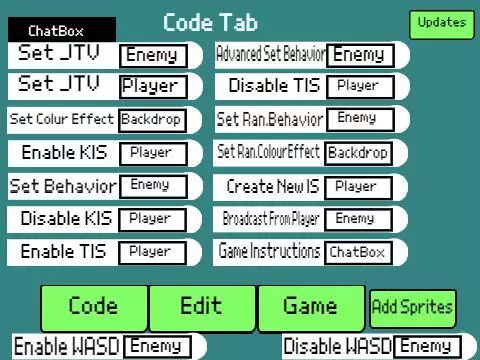
Set Behavior[Enemy] :
1 = Roam
2 = Attacking Straight Forward
3 = Stand idle
–
Set Random Behavior[Enemy] (Set Ran. Behavior Block) :
Randomly Sets The Enemy Behavior.
–
Set Random Color Effect [Backdrop] (Set Ran. Color Effect Block) :
Randomly Sets The Color Effect For Your Game Backdrop.
–
Create New IS(Input System)[Player] :
Input Values: Up, Down, Right, left, Jump.
Note: For The Right & Left Side Of The Screen Answer Box, You Can Only Put The Right & Left Inputs.
–
KIS “Keys Input System”
Arrow Keys To Move & Jump.
–
TIS “Touch Input System”
Touch On The Left/Right Of The Game Screen To Move
–
New KIS:
Up Arrow Key To Go Up and Not To Jump Like The Older Input System.
Dow Arrow Key To Go Down.
–
Broadcast From Player[Enemy] :
Codeline Inputs:
BrFrom(Player)To[enemy]Eqpt = {Flare}; – This Input Makes Shoot The Flare From Player To Enemy.
BrFrom(Player)To[enemy]Eqpt = {Flare}Colors = {SetColorEffect}; – This Makes The Same As Before Defined Codeline But Allows You To Set The Color Effect Of The Flare.
IfClickedSelf
: – Creates A Flare When The User Clicks The Player Sprite.
“When Enemy Received” Inputs:
Kill – Kills The Enemy And Finishes The Game(After This, Restart The game Engine To Work Properly).
Damage – Takes Half Of The Health From Enemy.
–
Game Instructions[ChatBox] :
Asks You To Set The Game Instructions Which Will Read Out By The ChatBox When The Game Starts.
It Also Asks You To Set The Seconds Which Will Be The Time Difference That The Instructions Read Out.
–
Advanced Set Behavior Block:
Inputs:
Flappy – Enemy Glides On The Middle Of The Screen.
Platformer – Enemy Glides on The Bottom Of The Screen.
Skydiver – Enemy Glides On The Top Of The Screen.
–
Enable WASD [Enemy] :
Enables WASD Keys To Move Enemy And Play The Game As The Enemy is The Player 2.
–
—
/v4.0 – Eighth Version “Near To Finish Update: New Set JTV Enemy Block, Advanced Set Behavior Block And Enable & Disable WASD Keys For Enemy Blocks” – Dec 11-2022./
—
/Versions List:
v1.0 – First Version – Nov 24 to 25-2022.
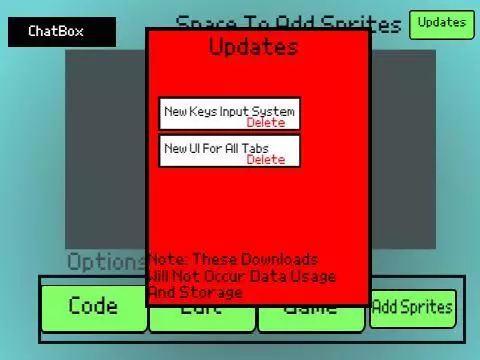
v1.2 – Second Version “New Keys Input System” – Nov 26-2022.
v1.3 – Third Version “New UI For All Tabs” – Nov 27-2022.
v1.4 – Fourth Version “New Input System: TIS” – Nov 29-2022.
v1.5 – Fifth Version ” Mobile Friendly Update: New Set Random Enemy Behavior Block, New UI & New Add Sprites Button” – Nov 30-2022.
v2.0 – Sixth Version “Mega Update: New Set Random Color Effect To Backdrop Block And New Create Input System Block” – Dec 3-2022.
v3.0 – Seventh Version “Fully Finished Update: New Code Blocks Like Broadcasting & Set Game Instructions. New Right & Left Touch Input Set Answer Box In ‘Create New IS’ Block” – Dec 5-2022.
v4.0 – Eighth Version “Near To Finish Update: New Set JTV Enemy Block, Advanced Set Behavior Block And Enable & Disable WASD Keys For Enemy Blocks” – Dec 11-2022.
/
—
/This Game Is Also Available On Scratch:
https://scratch.mit.edu/projects/766915610/
/
—
/——————————————————————————————————/
2D像素画面Game engine
※ 游戏本体及图像的版权均归原制作方所有
※ 内容贡献者名单:Steamer

