# msx-dino.bas
https://github.com/albs-br/msx-dino.bas
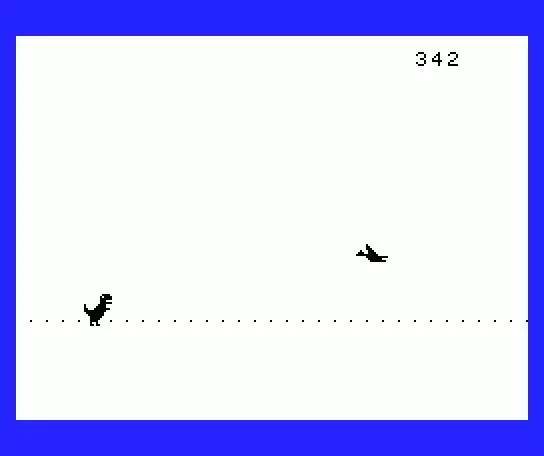
Attempt to recreate the famous Chrome browser Dino game on a 10-liner MSX-Basic program
It can be run on any MSX machine (all generations) or MSX emulator by loading the file “DiskImage.dsk”.
Can also be run directly on any browser:
https://msxpen.com/codes/-NR883eaKwP32_gy2gB0 (production version)
https://msxpen.com/codes/-NR8-A7dx6l4xVtpQTxI (development version)
Commands:
– Just use spacebar to jump
Full explanation of code available in the file “code explained.bas”
Sprites were made with TinySprite. A backup file file is provided (“tinysprite_bkp.txt”).
code explained
———————-
0 ‘ ———— Initialization
1 RESTORE ‘ necessary to read DATA on game restart
2 DEFINT b-z ‘ integer variables are faster
3 KEYOFF
4 SCREEN 1,2,0
5 y = 128 ‘ initializing only vars with value different from 0 (default value for INT)
6 m = -1 ‘ Enemy X (set to -1 to force first enemy respawn)
7 s = 0 ‘ Score (needs to be reset on each new game)
8 ON SPRITE GOSUB 70 ‘ setting up collision detection
9 SPRITE ON ‘ enabling collision detection
10 ‘ ———— Initialization (cont.)
11 FOR i=0 TO 68
12 VPOKE 6688+(i AND 31), 0 ‘ fill one NAMTBL (32 chars) line with the value of floor tiles (0)
13 READ a$
14 VPOKE 14343+i, VAL(“&H” + a$) ‘ fill SPRPAT for the 3 sprites (69 bytes). (the zeroes on the start/end of patterns are ignored)
15 NEXT
16 b = 1 ‘ foreground color = BLACK
17 f = 15 ‘ background color = WHITE
20 ‘ ———— Initialization (cont.)
21 f(0) = 1 ‘ floor frame #0 (00000001 pattern)
22 f(1) = 4 ‘ floor frame #1 (00000100 pattern)
23 f(2) = 16 ‘ floor frame #2 (00010000 pattern)
24 f(3) = 64 ‘ floor frame #3 (01000000 pattern)
25 ‘ part of sprite pattern data, put here to use empty line space
26 DATA 4,6,7,23,73,FF,7,3,1,0,0,0,0,0,0,0,0,0,0,80
29 ‘——————————- MAIN LOOP —————————–
30 ‘ ———— Floor animation
31 VPOKE 6, f(s AND 3) ‘ change just one line of the tile pattern #0 (floor tile)
32 ‘ ———— Player jump (between Y coordinates 128 and 81)
33 IF y < 81 THEN j=3 ELSE IF y = 128 THEN j = STRIG(0)*3 ' STRIG(0) returns -1 when space bar is pressed, making jump control variable (j) equal -3. If not pressed returns 0 making j = 0
40 ' ———— Enemy respawn
41 ' This IF had to be divided in two lines (this one and 50)
42 IF m 6 THEN v = 7
43 ‘ n = 96+INT(RND(1)*3) * 16 ‘ random new enemy Y value
44 ‘ i = b : b = f : f = i ‘ invert background and foreground colors
45 ‘ v = s/100 + 2 ‘ update current game speed (minimum 2) based on score
46 ‘ IF v > 6 THEN v = 7 ‘ cap max game speed to 7
50 IF m < 0 THEN BEEP : m = 255 : LOCATE 22,1 : ?s : COLOR f,b,4 : p = 0 : IF n = 128 THEN p = s AND 2
51 ' BEEP
52 ' m = 255 ' enemy X initial value
53 ' LOCATE 22,1 : ?s ' print score
54 ' COLOR f,b,4 ' update screen foreground and background colors
55 ' p = 0 ' set enemy pattern to 0 (bird)
56 ' IF n = 128 THEN p = s AND 2 ' if enemy Y is 128 (floor level) it can be pattern 0 (bird) or 2 (cactus)
60 ' ———— Gameplay
61 PUTSPRITE 0, (32, y), f, 1 ' player sprite
62 y = y+j ' pleyer Y plus j (jump control variable)
63 PUTSPRITE 1, (m, n), f, p ' enemy sprite
64 s = s+1 ' increment score
65 m = m-v ' update enemy X based on current game speed (v)
66 GOTO 30 ' restart main loop
69 '——————————- MAIN LOOP —————————–
70 ' ———— Collision
71 LOCATE 22, 1
72 ?s ' print score
73 LOCATE 11,11
74 ? "GaMeOvEr" ' print game over string
75 PLAY "DFDA" ' play game over sound
76 FOR i=0 TO 3000 ' wait a few instants
77 NEXT
78 SPRITE OFF ' disabling collision detection to avoid it being re-triggered on next restart
80 RETURN 0 ' restart game
81 ' Sprite data is on hexadecimal, which is less verbose than decimal and binary, saving a few chars.
82 ' Besides this, data is adjusted in a way that the empty parts of the sprites
83 ' are on the start and end of the sequence and can be ignored
84 ' (VRAM is filled with zeroes by the interpreter on initilization)
85 ' Other trick is trying to put the sprite the rightmost possible inside the
86 ' 16×16 (or 8×16) box, to give smaller hexa numbers (the left digit can be ignored if is 0)
89 DATA C0,E0,FF,F8,FE,0,0,0,0,0,20,20,31,3F,1F,F,7,7,6,4,6,1E,2F,3F,38
90 DATA 3F,78,F8,FE,F8,F0,F0,E0,C0,80,80,C0,18,1B,DB,DB,DB,DE,7C,38,18,18,18,18
动作8-Bitmsxbasicbasic10liner
※ 游戏本体及图像的版权均归原制作方所有
※ 内容贡献者名单:Steamer

