STEPPER is a new 16-step sequencer for the Game Boy Advance (GBA).
It features an intuitive workflow inspired by Elektron instruments with per-trigger parametrization that allows access to the 4 DMG sound channels in the console (2 square waves channels, 1 custom wave channel and 1 noise channel). Supports 4 banks of 8 patterns that can be queued for live performance.This project is open source and can be downloaded for free here. For more information you can keep reading or visit the project page on my website.
Controls
D-Pad: Moves the cursor.Start: Start/Stop the sequence.Select: Context dependent copy/paste.B: Toggles channels/triggers and play/pause/stop, switches banks and patterns.A: Holding it while the cursor is on a trigger allows the adjustment of the trigger parameters.L/R: Change trigger notes, parameter values, or BPM.
Save/LoadSTEPPER supports up to 4 banks of 8 patterns each. The current bank is saved by switching banks or selecting the current one in the bank section. The banks are saved to the SRAM and upon launching STEPPER the last saved state will be loaded.PatternsPatterns can be changed or edited by navigating to the left column with the cursor. Pressing the B button will queue a pattern to run on the next cycle. The queued pattern will be highlighted in blue. Only on pattern can be chained at the moment.We can edit different patterns other than the one that is currently playing. The pattern we are currently editing is represented by a grey/blue cursor whilst the one in play is highlighted in white.Each pattern stores information about active channels and their trigger notes and parameters. BPM can also be stored independently for each pattern.
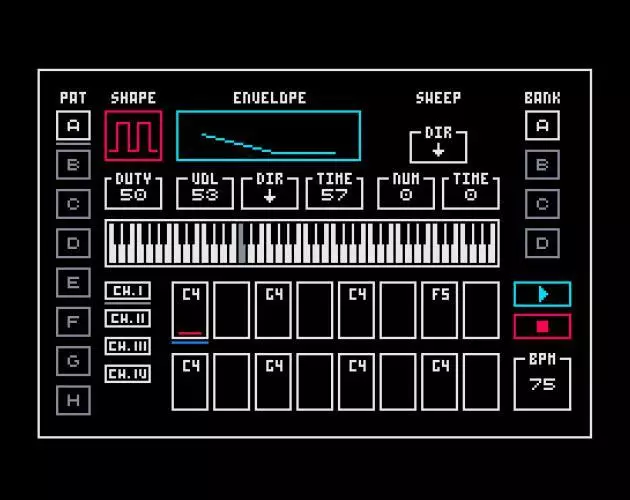
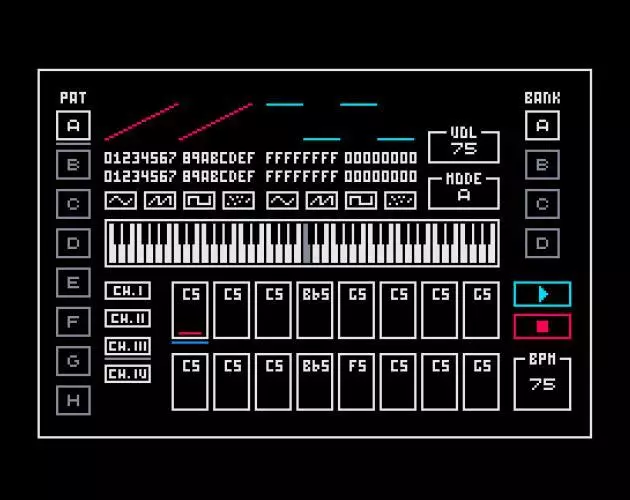
ParametersChannels 1 and 2 allow us to control the square wave duty cycle and envelope (Initial volume, direction and time). Additionally, channel 1 can access the “sweep” parameters, which when the time is not zero allows for some interesting FX.Channel 3 is the wave channel. In this channel we have access to 2 programmable waves that can be edited manually or selected with 4 available presets (sine, saw, square, random). The waves can be played independently (mode A or B) or one after another (Mode A + B). This channel has no volume envelope thus a note will keep playing until it encounters an active trigger with zero volume or a different pitch.Channel 4 is the noise channel, mostly used for percussive effects. It uses an envelope to shape the sound and has two modes of operation. Mode A is more rounder and mode B sounds more metallicCopy/PasteThe GBA has a limited set of controls but using STEPPER’s contextual clipboard we can greatly speedup the editing workflow. We can use “Select + B” (Copy) or “Select + A” (Paste) to perform clipboard operations.
If the cursor is selecting a pattern, the entire pattern will be copied, including active channels, triggers and parameters. Patterns can only be pasted in other patterns.Channels can be copied to other patterns or channels. If the paste destination is a channel other than the original one, only the notes and active triggers will be copied. If the channel is of the same time, all the parameters will also carry over.Copying a trigger transfer its pitch (note), active state (on/off) and its parameter settings (Assuming the target is compatible, as explained above). If we only want to copy the parameters, hold “A” to enter parameter select mode and press “Select” to copy them. Now you can paste them to any compatible trigger.Note that the clipboard doesn’t currently transfer between banks due to the platform’s limitations.
音乐Game BoyGame Boy AdvanceMusic Production
※ 游戏本体及图像的版权均归原制作方所有
※ 内容贡献者名单:Steamer

